A Unity Editor inside the agent container: how our fleet shipped its first game
How an autonomous agent fleet got a real Unity Editor, a GPU and a licence inside its task containers, what broke on the way, and the first browser game it shipped end to end.
Until this September my agent fleet could write Unity code but could not prove it worked. A pull request on a Unity repo arrived with a caveat: "not built, build locally". The executor had no Editor, no GPU and no licence inside its container, so every Unity change waited for a human with a laptop. This is the story of how the Editor moved into the fleet, what broke on the way, and the first game the fleet shipped end to end, with the numbers I have rather than the ones I would like to have.
The trigger
On 2026-08-21 Unity deprecated its in-Editor MCP server in favour of a Unity CLI. That changed the shape of agent-driven Unity work from "a plugin inside a running Editor" to "a vendor-supported command line", which is exactly the shape an autonomous executor can drive. The fleet host already had the hardware: an RTX 3060 Ti for the Editor and the PlayMode suites, a KVM device for an Android emulator later, and 1.7 TB of free disk, which matters because each Editor install and each project's Library cache runs to gigabytes and both are kept warm between tasks. The missing piece was a design that let a task use an Editor without letting a task own the build that ships.
Two contours, no shared state
The decision that shaped everything else: the host is split into two build contours with no shared build state.
Contour A is a self-hosted GitHub Actions runner on the same machine. It runs the EditMode and PlayMode test suites on every pull request and builds named platforms on explicit dispatch: linux, android, webgl, windows. That is what ships. A task container never touches it. Each repo gets its own runner account on the host, and the workflows share one concurrency group because there is one GPU.
Contour B is the task container the executor works in. It gets the same Editor, read-only, for verification only: compile the project, run both suites on the real GPU, write the NUnit results outside the repo, and put the counts into the pull request. If a task asks for a build, it gets one under its own scratch directory, never in the artifact the runner produces.
The rule that makes the two contours honest is simple: the thing that ships is never built by the agent that wrote it. Sharing the Editor binaries between the contours is fine; sharing build output would collapse the distinction.
What a Unity task actually gets
A repo is a Unity project because it carries a ProjectSettings/ProjectVersion.txt, and that file names the Editor version. If that version is installed on the host, the launch mounts it into the container read-only from a per-version directory; if not, the task runs exactly as before and the pull request says so. Only one Editor version is installed today, 6000.5.4f1, because that is what the repos pin.
Inside contour B, two interaction layers sit on top of the mounted Editor, and the difference between them is who holds the Editor open. Layer 1 is batch mode per invocation, which works for every Editor version: -batchmode -projectPath . -runTests -testPlatform EditMode and the same for PlayMode, one after the other, because the host has one GPU. Each command exits 0 when its suite is green and 2 when a test fails, and the NUnit XML carries the per-test detail. The task mount is read-only, so results go to a temp directory.
Layer 2 keeps one Editor open for the whole task and drives it through the Unity CLI, for projects that opt into com.unity.pipeline. The CLI binary went through a security vetting before it was allowed near the fleet, is pinned to a specific beta build, and is never allowed to self-update. Measured on the host: a command eval round-trip takes about 130 ms, an EditMode run through the live Editor about 1 s, and closing the Editor 11 s.
Those three numbers decided how the layers are used. The 130 ms and 1 s figures make the live Editor the right tool for the executor's inner loop: change a script, ask the Editor whether it compiles, run the suite again, dozens of times per task. The 11 s close is the price of leaving that loop, and it has to be paid before any batch-mode command, because a live Editor and a batch Editor both want the project lock and the second one refuses to start. So the live Editor is for iteration and the batch suites are the gate: the numbers that go into the pull request always come from a batch run against a closed Editor, which is also what the CI runner does. Keeping the two in step matters, because when a check and the merge disagree you end up with two green pull requests and a red main.
The three things that broke
The licence. I wanted Unity Personal through a licence file, activated once on the host and mounted read-only into every container. Unity's manual activation page refused with the words "offline activation is available only for Enterprise and Industry seats", so the documented request-file-to-licence-file procedure is dead for Personal. The path that works is the Editor's own bundled licensing client, run on the host: Unity.Licensing.Client --activate-ulf --username . It writes Unity_lic.ulf under ~/.local/share/unity3d/Unity/, not under ~/.config where the documentation points. The catch: the file is bound to a hash of the hostname and the machine id. A container is a different machine unless it borrows both, so the Unity mount set now includes the host's hostname and a read-only mount of /etc/machine-id. A Personal licence also means there is no seat to return when a container is killed: with a Pro seat every task would have to run -returnlicense on exit and a killed container would leak a seat until it timed out, so the launcher would need a reaper for licences as well as for containers. Personal has no seats, so that reaper never had to be written.
The GPU. On Docker 29.7, --gpus all fails outright with "AMD CDI spec not found". The card is NVIDIA; the message names the first vendor spec Docker looked for, and the underlying condition was that this release resolves --gpus through the Container Device Interface and the host had no CDI spec at all. The fix was to generate the CDI spec for the NVIDIA device at /etc/cdi/nvidia.yaml and pass the device by its CDI name, --device nvidia.com/gpu=all, instead of the legacy flag. An X server on its own display serves the Editor, and the NVIDIA runtime is registered by reloading Docker, never restarting it, because a restart would take every running task with it. Parallelism is a configuration knob set to three Unity tasks at once: enough to keep an executor, a reviewer and a revise round running on one repo, few enough that three Editors fit in the card's memory alongside the X server.
The egress allowlist. Tasks run behind a Squid proxy with a domain allowlist. Unity's package registry and the licensing hosts had to be added, and the first edit listed a bare domain next to its leading-dot form, the shape that also matches subdomains. Squid treats the pair as overlapping destination rules and refuses to start on a FATAL, so every task lost network access at once, not just Unity. The diagnosis was the proxy's own startup log; the fix was one line, and the fleet shipped it itself. One more trap in the same file: the allowlist is bind-mounted by inode, so after an edit the setup script has to be re-run, a plain pull changes nothing.
The first game
The pilot was deliberately small: tic-tac-toe against an AI, in Unity 6, playable in the browser. Small enough that the pipeline, not the game, was the thing under test. The repos this infrastructure exists for are larger: a Unity SDK for in-game advertising, a Linux graphics application, a settlement strategy game and a mobile product, each of which pins its own Editor version and gets the CI runner and the workflows wired only when it is actively in work.
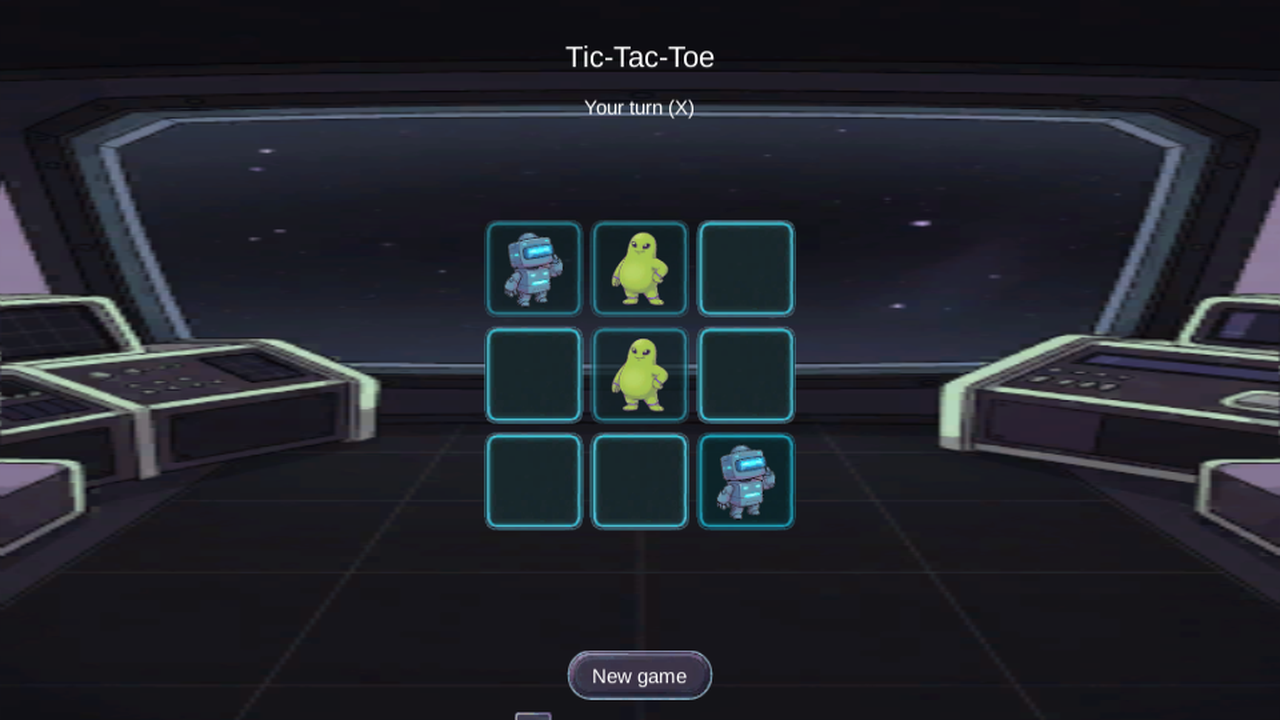
The executor ran on Claude Opus 5 inside a task container with the real Editor mounted. It wrote the rules and the two opponents as engine-free C# in an assembly that is forbidden from referencing the engine, so the minimax search over the whole game tree is plain code any test runner can execute. The perfect opponent searches the whole tree, scores a quick win higher than a slow one and postpones an unavoidable loss as long as it can, so it never loses; the random opponent picks a uniformly random legal move and makes the game winnable. The interface is built in code at startup with uGUI, which keeps the scene file down to a camera and one controller and lets PlayMode tests click the real buttons rather than call methods. At the first pull request the EditMode suite had 52 tests covering the board, the rules and both opponents, and the PlayMode suite had 5 tests that load the scene and play through the real interface, all run headless on the GPU.
The reviewer ran on GLM 5.3 Flash, a different vendor's model from the executor on purpose: the fleet routes half of its review work to that model family, so a review is a second pair of eyes rather than the executor grading its own homework. It executed the same suites in its own container and returned findings over four rounds. A revise round on Claude Fable 5 answered them. I approved the result from a Telegram card without opening an IDE.
The art pass
The art came from a second task, and it is where the pipeline earned its keep. Every asset, the control room background, the board cells, the win line, the two mascots and the interface skins, was generated through Grok by a task on the host that holds the subscription; the credential never enters a container. The task curated the candidates against a written style document that fixes the world, the two characters, the palette and what counts as a reject: one visor eye on the robot, exactly two eyes and three fingers on the alien, a primary colour covering at least half of each body, no third saturated colour. Eleven rounds of stills and one clip went through the endpoint for the pilot.
Each mascot's win celebration is a sprite sheet of 8 cells of 256 px, cut from a single image-to-video clip at 12 frames per second and seeded by the approved idle still, so the frames belong to one motion instead of eight unrelated pictures. The motion on the board is code: a mark jumps into its cell over 0.35 s with a scale from 0 to 1.15 and back to 1.0, the hover glow moves from 0.4 to 0.8 opacity over 0.12 s, the win line grows over 0.4 s, and the win strip plays 3 loops and holds its last frame.
The review of that task caught two real defects before merge. "New game" left the mascot art on the board because the cache of what was drawn was cleared before the game reset rather than after, so the redraw thought every cell already agreed with the empty board. And the win line covered only about 42% of the winning line: the rectangle was right but the generated pill sat in the middle of a fixed 512 px canvas. Both were fixed in the revise round with tests that plant the failure first.
Publishing and the teaser
The WebGL build came off the runner on the host. Unity ships the bundle gzip-compressed without a decompression fallback, so the files are uncompressed and the loader repointed before the bundle is copied to a static file server that compresses on the fly.
The teaser is a real recording, not a render. A headless Chrome on the laptop's own GPU plays two rounds through the DevTools protocol at 30 frames per second; the same recording under a software renderer managed about 15 and juddered. Sound cues are placed on the frames where each mark actually appears, verified against the finished video: 13 of 13 cues land on a visible change. The video is 27 s long, 1280 by 720, and went to YouTube through the same approval gate as every other post.
You can play the game here: media.tytarenkoagency.com/games/tictactoe. The case with the stack and the pipeline is on the showcase: tytarenkoagency.com/showcase/tictactoe-unity. The teaser of two real rounds is on YouTube: watch the teaser. Every case the fleet has taken end to end sits on the showcase index.
What I would tell a CTO
Three things I did not expect, in order of how much time they cost.
The licence is the hard part, not the GPU. Every hour on this project that went to the GPU went to one Docker flag; the licence cost a rejected web form, a licensing client nobody documents, and a machine-id binding that had to be reproduced inside a container.
Separate the model that reviews from the model that writes. The four review rounds on the game and the two defects caught on the art pass came from a reviewer that shares none of the executor's blind spots, running the same tests in its own container. A reviewer on the same model tends to agree with itself.
Make the iteration loop fast and the gate slow, on purpose. A 130 ms compile check and a 1 s test run are what let an executor try things; an 11 s Editor close before every batch suite is what makes the numbers in the pull request trustworthy. Optimising the gate for speed would have meant trusting the live Editor's numbers, and the live Editor is where the executor has been editing.
FAQ
How does a task find out it may use Unity?
The launch sets UNITY_EDITOR and UNITY_VERSION and puts a unity-editor wrapper on the PATH with batch mode and log-to-stdout baked in. When any prerequisite is missing, the launch degrades silently: the variables are unset, there is no Editor, and the pull request has to state that Unity was not verified.
What does the executor put in the pull request?
A ## Unity section with the EditMode and PlayMode counts from its own batch runs, or the sentence that Unity was not verified. The CI runner repeats the suites on the pull request, so the executor's numbers are a claim and the runner's are the check.
What was checked before the Unity CLI was allowed on the host?
The binary was read as an untrusted artifact and rated a structural medium risk; the install script is never run, self-update is disabled, and the version is pinned to one beta build. The two commands the documentation advertises for evaluating code and listing running Editors do not exist in that build.
What stays open?
The X display the Editor draws on is world-open on the host, and the task launcher still passes some tokens on the command line of the container process. Both are tracked as danger-class items and neither is fixed by this work.
Related reading
Maksym Tytarenko
AI & SaaS Development Expert at Tytarenko AI Agency
Related Articles
Thirty-Four Minutes to Two: What pytest-xdist Exposed in a Nearly 9,000-Test Suite
pytest-xdist cut my agent fleet's CI test step from 34m40s to about two minutes. The speedup was the easy part: parallel runs exposed three classes of shared state the serial suite had been hiding.
12 min readAI & MLWhen the Tripwire Cries Wolf: Small-Sample Review Metrics in an Agent Fleet
Two model tiers in my agent fleet tripped a degradation alarm on the same night. The data said 7 of 12 and 7 of 13, p around 0.12. A post-mortem on correlated small samples, and the three-part fix the fleet shipped itself.
10 min readAI & MLStreamlining AI Agent Deployments: From Frequent Restarts to Efficiency
My agent fleet logged 10 deploys and 12 restarts in one day, and restarts kept killing in-flight reviews. A drain flag, a quiet probe, and batched merges cut that to 2 or 3 restarts a day without touching the agent loop.
12 min readReady to Build Your AI-Powered Solution?
Let's discuss how we can help you leverage AI to transform your business.
Get in Touch