Two Runner Listeners, One Work Directory: A Self-Hosted CI Post-Mortem
My agent fleet's CI started failing 3 to 18 seconds into every job. The cause was two GitHub Actions runner listeners sharing one work directory, left behind by a runner self-update and KillMode=process. The diagnosis, and the ExecStartPre fix.
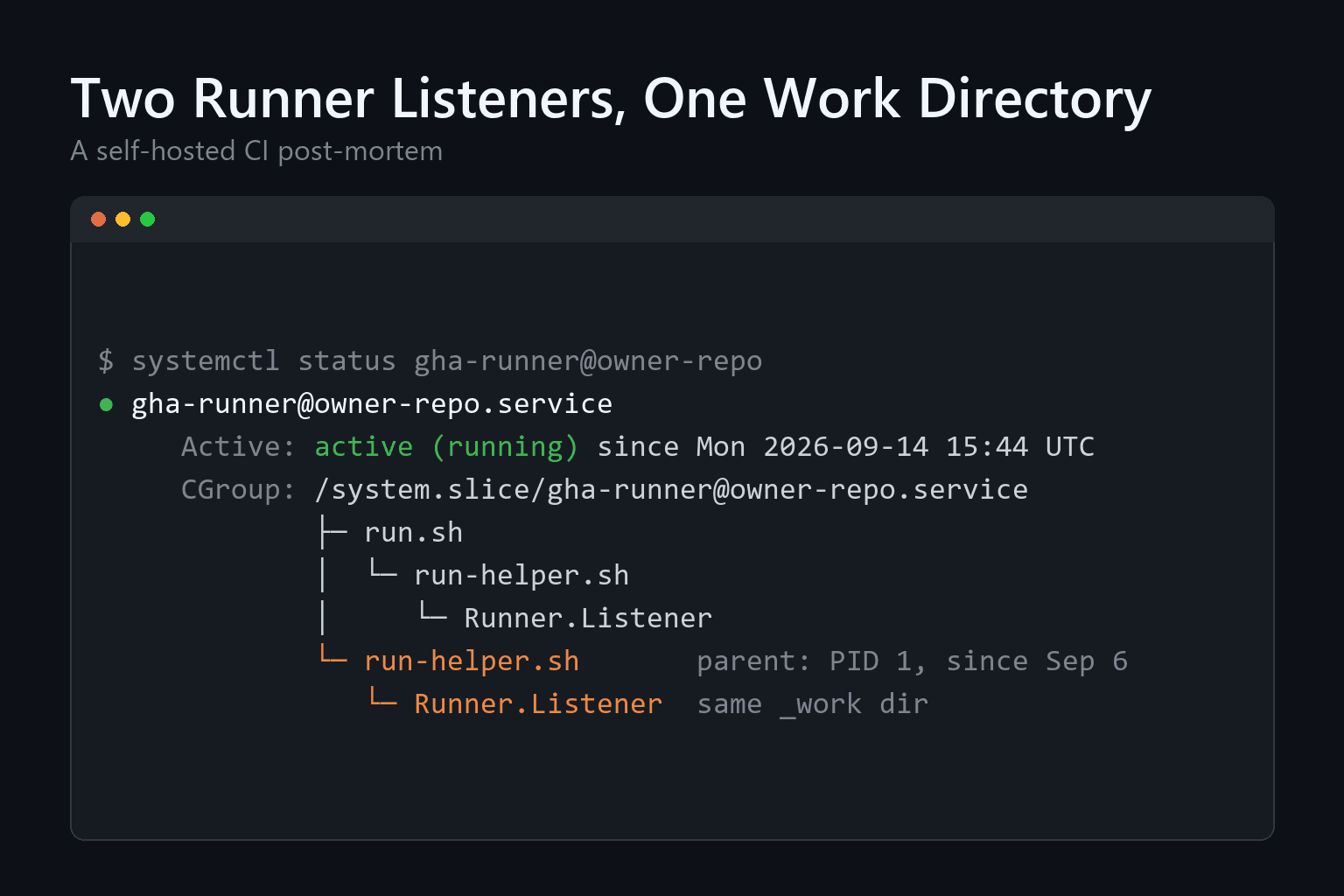
On September 14, the CI for my agent fleet started failing in seconds. Not in minutes, not after a long test run: three to eighteen seconds after a job started, it was already red. The code under test had nothing to do with it. The cause was two copies of the GitHub Actions runner listener, both alive, both registered as the same runner, both working in the same directory.
This is the post-mortem. It covers how the failure looked, why a systemd restart left an eight-day-old process running, the one-off fix, and the permanent fix that moves the check into the unit itself.
Some context first. My fleet is a daemon that polls a GitHub Projects board and runs each task as headless Claude Code inside a Docker container. Every pull request those agents open goes through CI, and that CI runs on self-hosted GitHub Actions runners on the same dedicated server as the fleet: one systemd template unit, gha-runner@.service, with one instance per repository. Running the runners myself is part of a wider pattern: open-source plumbing on one box can match enterprise-scale automation on a bootstrapped budget. When CI lies, the whole review loop stalls. A red check blocks the merge and sends agents chasing bugs that do not exist.
The symptom: CI that fails before it starts
Two runs on the same pull request failed back to back. The logs had two errors that make no sense for application code:
##[error]Missing file at path .../_work/_temp/_runner_file_commands/set_output_*
xargs: python: No such file or directory
The first one says the runner could not find a file it had created itself a moment earlier. _runner_file_commands is where the runner keeps the files that steps use to set outputs and environment variables. The second one says the Python interpreter from the CI virtual environment vanished in the middle of a job.
Two details told me this was the machine rather than the code. CI on main had been green at 13:01 UTC that same day. And a real test failure takes time to reach; these jobs died during setup. When a job cannot find the files it just wrote, something else is deleting them.
Two listeners in one cgroup
The runner service belongs to a dedicated account, so I went in through the admin account with sudo and looked at the unit:
sudo systemctl status gha-runner@-
The CGroup tree in that output showed the answer immediately. The unit had two Runner.Listener processes:
run.sh to run-helper.sh to Runner.Listener, started when the unit restarted at 15:44 UTC on September 14;run-helper.sh whose parent was PID 1, with its own Runner.Listener, running since 10:53 UTC on September 6.The journal filled in the timeline. After the 15:44 restart, the new listener logged "A session for this runner already exists" and kept retrying. At 15:47 it got through. From then on, both listeners polled GitHub for jobs under the same registration, and both ran them in the same _work directory.
That explains both errors. Each job's cleanup deletes the _temp directory, and in a shared work directory that means deleting the other job's _temp as well, CI virtual environment included. One job writes its command files and its venv. The other listener's job finishes and wipes the directory. The first job falls over looking for files that existed a second ago.
Why a restart did not kill the old listener
The obvious question: how does a process survive eight days and a service restart inside the very unit that was restarted?
The answer is one line in the unit file, KillMode=process. It is there on purpose. It mirrors how GitHub's own svc.sh installs the runner as a service: on stop, systemd signals only the main process, run.sh, so a listener holding a job gets to retire that job cleanly instead of being killed mid-step. With the default KillMode=control-group, a stop would kill every process in the cgroup at once, the running job included.
The runner also updates itself. A self-update relaunches through a new run-helper.sh, and the old helper and its listener do not always go away. When their parent exits, they get reparented to PID 1. From that moment they are outside the process tree of run.sh.
Here is the part that is easy to miss. Reparenting does not change cgroup membership. The orphan is no longer a descendant of the main PID, but systemd still counts it as part of the unit. So on the next restart, KillMode=process signals only the new main PID, exactly as designed, and the orphan keeps running. It sat in the unit's own cgroup the whole time, and nothing ever sent it a signal.
My setup script for the runners already handled this case, partly. Its stop routine drained any leftover listener before starting a new one. But that only covered restarts the script itself drove. A plain systemctl restart, a crash followed by Restart=always, or a runner self-update never went through that path, and in practice those are most of the restarts a runner sees.
The immediate fix
Stopping the orphan took one command. Around 20:10 UTC I sent SIGTERM to the old run-helper.sh and its Runner.Listener:
sudo kill -TERM
One listener remained, and I re-ran the failed jobs. Note what I did not do. This unit has Restart=always, so killing the main process would only make systemd start a fresh one next to the orphan. The target has to be the orphan, not the unit.
That fixed the day but not the bug. The same sequence would come back on the next self-update followed by a restart, on this runner or on any of the four runner instances that share the template unit. So I wrote up the incident, the cause and the fix I wanted as an issue, and handed it to the fleet.
The permanent fix: drain before every start
The fix lives in the unit itself, as an ExecStartPre helper. Before systemd starts a new listener, the helper looks for any leftover listener of the same instance in the unit's cgroup and stops it. Because it runs on every start, it covers every kind of restart, not just the ones the setup script drives.
The unit change is small:
ExecStartPre=/usr/local/lib/agent-corp/gha-runner-prestart.sh %i
TimeoutStartSec=6min
KillMode=process
The helper does four things.
/proc/self/cgroup and lists the PIDs in that cgroup's cgroup.procs. The search is scoped to this unit, so it cannot touch another runner's processes.argv[0] from /proc//cmdline and compares it with the full path of this instance's listener binary, //bin/Runner.Listener acme-repo must never match one called acme-repo-2.A few design decisions are worth spelling out, because each one comes from a failure the fix itself must not cause.
KillMode=process stays. The problem was never the stop path, and graceful job retirement on stop is still the behavior I want. The fix adds a check at start instead of changing what stop does.
TimeoutStartSec goes up to 6 minutes. systemd's default start timeout is 90 seconds. A drain that waits for a job to finish can take far longer than that, and systemd would kill the start halfway through and count it as a failed attempt against StartLimitBurst. The start timeout has to outlast the longest drain.
The helper runs as the runner's own account, the same user as ExecStart. It can only signal processes that account owns. Fixing this needed no extra privilege at all.
It fails open. On a host without the cgroup v2 unified hierarchy, it logs that it is skipping and lets the listener start. The fleet's hosts run cgroup v2, and blocking every runner start on an assumption that might not hold elsewhere would trade one outage for another. On such a host the older stop-time drain in the setup script is still there.
The setup script now installs the helper too, root-owned with mode 0755. It converges the helper separately from the unit, so changing only the script does not trigger a stop and start that would interrupt a healthy running job. And since all four instances share the template unit, one file change covers every runner.
One caveat about that file: CI does not ship it. The unit and the helper are installed on the server by hand, so merging the fix and running it are two separate steps, and the second one is easy to forget. I forgot it. The fix sat merged for a day while the live unit still had no ExecStartPre. After installing it, I ran a plain systemctl restart on one runner, the exact path that produced the orphan in the first place. The old listener stayed behind in the cgroup again, and this time the helper logged found 1 leftover Runner.Listener process(es) still in this cgroup, then drained. One listener came back up, connected to GitHub, and started listening for jobs.
Testing a lifecycle fix without the host
The agent that wrote the fix ran in a container with no access to the real server. It could not restart a live systemd unit and watch what happens. The tests work around that: the helper takes its cgroup and proc roots from environment variables, the tests point them at throwaway directories, and they spawn real OS processes that stand in for the listener.
Ten tests came out of this. Some are structural checks that the unit, the timeouts and the setup script are wired together. The behavioral ones cover the no-op case, a leftover that exits on SIGTERM, one that ignores SIGTERM and gets SIGKILL, the acme-repo versus acme-repo-2 prefix collision, and the fail-open path.
Getting those tests honest took three corrections, and the dead ends are the most useful part of the write-up. The same discipline applies to any check scored against real merged history: one true positive in thirty reads very differently from six hits in three pull requests.
The first stand-in for Runner.Listener was a shell script with a #!/usr/bin/env bash shebang. The helper never matched it. The kernel's handling of script execution rewrites argv[0] to the interpreter, so /proc/ read bash followed by the script path, never the listener path. The real listener is a native binary. So the test copies /bin/bash itself into place and executes it directly with the right argv[0], which is exactly how the real process looks in /proc.
The second problem was a zombie. The test did not reap its child promptly, so /proc/ stayed present after the process exited. The helper kept seeing it as alive, and both the "drains on SIGTERM" and "escalates to SIGKILL" tests ended up on the SIGKILL path. On the real host this cannot happen, because the orphan's parent is PID 1 and PID 1 reaps immediately. The test now starts a background thread that waits on the child, the way init would.
The third was a small bug in the helper itself. Its final log line multiplied the poll interval by the poll count to print the total wait. Bash arithmetic is integer only, and the tests use a fractional poll interval to run fast, so that line was a syntax error. It now prints the count and the interval separately.
What I took away
The cgroup is the unit's real boundary, not the process tree. Anything that reasons in parent and child PIDs will miss processes systemd still considers part of the service. When a unit behaves strangely, the CGroup tree in systemctl status shows what the unit actually contains.
CI that fails in seconds is a signal in itself. Green on main a few hours earlier, red during setup now, errors about files the runner wrote itself. That combination points at the machine. Seeing it early saves a round of agents trying to fix code that is not broken. And a red main does not always need a broken machine: two green pull requests and one stale merge ref were enough to do it.
Fix the class, not the instance. Killing the orphan took one command. The same failure was one self-update away from happening again on four runners. Once the drain sits in ExecStartPre, it runs no matter who or what restarts the unit.
Every safety default in the fix exists because of a failure it must not cause. Keeping KillMode=process protects running jobs. The longer start timeout keeps systemd from failing a slow drain. Running as the runner account limits what can be signaled. Failing open keeps a missing kernel feature from blocking all CI.
FAQ
Why did two Runner.Listener processes break CI instead of just running jobs in parallel?
Both listeners used the same registration and the same _work directory. Each job's cleanup deletes _temp in that directory, so one job kept deleting the command files and virtual environment another job was still using. The jobs failed within seconds with missing-file errors.
Why not switch the unit to KillMode=control-group?
With control-group, stopping the unit kills every process in the cgroup at once, including a listener in the middle of a job. KillMode=process exists so the runner can retire its current job on stop. The fix keeps that behavior and adds a drain at start instead.
How do you tell a runner problem from a code problem?
Look at the timing and the error text. These jobs failed during setup, 3 to 18 seconds in, with errors about runner-internal files, and CI on main had been green hours earlier. Then run systemctl status on the runner unit and count the Runner.Listener processes in its CGroup tree.
Does the helper work on hosts without cgroup v2?
It skips the check and logs that it did. The listener still starts, and the drain in the setup script's stop routine remains the safety net on such a host.
Related reading
Maksym Tytarenko
AI & SaaS Development Expert at Tytarenko AI Agency
Related Articles
The Sweep Ran Every Hour. Fifty Closed Tasks Still Weren't Done.
My agent fleet's task board had an hourly sweep that moved closed issues to Done, and 50 closed issues still weren't Done. One board read showed why: every stuck card sat in a status the sweep never checked. The fix widened one list, cut the sweep's API cost by 99%, and taught it which cards it must report instead of touching.
9 min readAutomationFour Merge Presses, One Merge: Fixing the Approval Layer of My AI Agent Fleet
I pressed Merge on four agent pull requests and only one merged. The bug was an ack sitting upstream of the action, a serial update queue I was silently relying on, and a merge digest that could not see two PRs colliding on the same files.
14 min readAutomationFlagging Tests That Assert Nothing, When All You Can See Is the Diff
My merge-card scanner caught assertions being removed but never noticed a new test that had none. Closing that gap meant giving up on syntax trees, teaching the scanner to know when it is looking at a cropped view of a file, and measuring the false-positive rate on thirty merged pull requests before the line ever reached a human.
10 min readReady to Build Your AI-Powered Solution?
Let's discuss how we can help you leverage AI to transform your business.
Get in Touch